What GameDev.tv’s game development courses cost, what you can learn in Unity, Unreal, Godot, and Blender, whether the Lifetime Membership is worth it, and how it compares with Udemy.
By Michael Stromberg, Hack Reactor graduate (2016) · Last verified November 19, 2026
GameDev.tv is an online school that teaches only game development: Unity, Unreal Engine, Godot, and Blender, plus pixel art, game audio, and game math. Its courses are self-paced video courses with projects, sold one at a time, in bundles, or, at certain times of year, all together through a Lifetime Membership. It was founded by Ben Tristem, a long-time Udemy instructor, and many of its courses are also sold on Udemy.
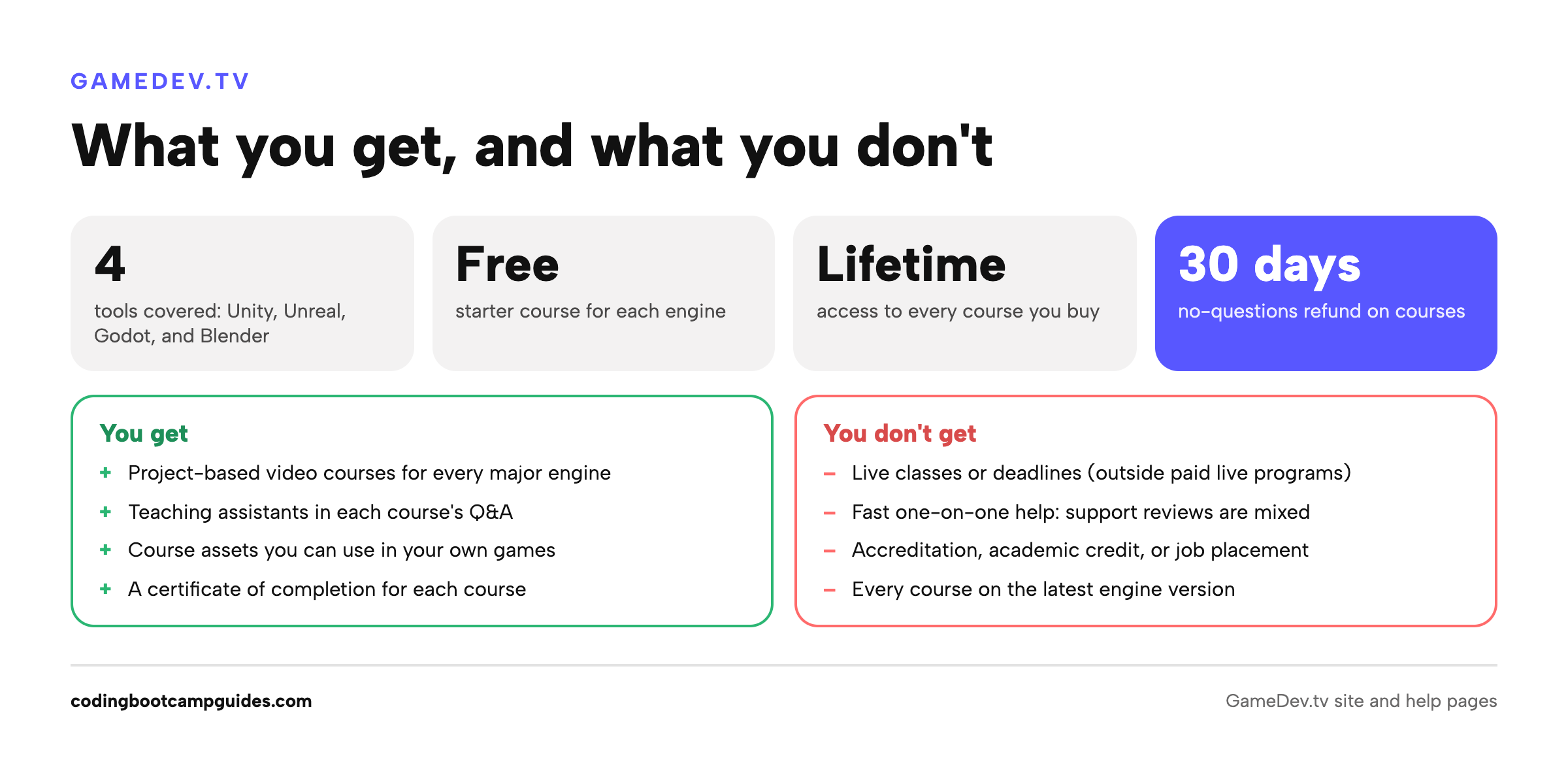
The short answer: GameDev.tv is one of the cheapest good ways to find out whether you enjoy making games. There’s a free starter course for each engine, and single courses and beginner bundles usually sell far below their list prices. Start with the free Godot course or the free course for your engine, then buy one beginner bundle. Only consider the Lifetime Membership if you’re sure you’ll take a lot of courses across engines. And keep your expectations about jobs realistic: no course or certificate gets you hired in games; finished games do.
We earn a commission if you buy through our GameDev.tv links, at no extra cost to you.
GameDev.tv at a glance
| GameDev.tv | |
|---|---|
| What it teaches | Unity (C#), Unreal Engine (C++ and Blueprints), Godot (GDScript and C#), Blender, pixel art, game audio, game math, GameMaker, and more |
| Format | Self-paced video courses with projects, a Q&A section answered by teaching assistants, and a community forum |
| Catalog | Dozens of courses, engine bundles, and a handful of live programs |
| Course prices | List prices of roughly $49–$195 per course, with frequent, deep discounts |
| Bundles | “Get Going” beginner and “Get Good” advanced bundles for each engine, plus seasonal bundles |
| Lifetime Membership | A one-time payment for every course, current and future; GameDev.tv says it’s normally offered once a year |
| Free courses | Get Started with Unity, Unreal, Godot, and Blender (1.5–2 hours each) |
| Refunds | 30 days, “no questions asked” (asset packs excluded once downloaded) |
| Credential | A certificate of completion for each finished course; no accreditation or academic credit |
| Best for | Beginners testing game development, hobbyists, and coders adding game skills |
What it costs
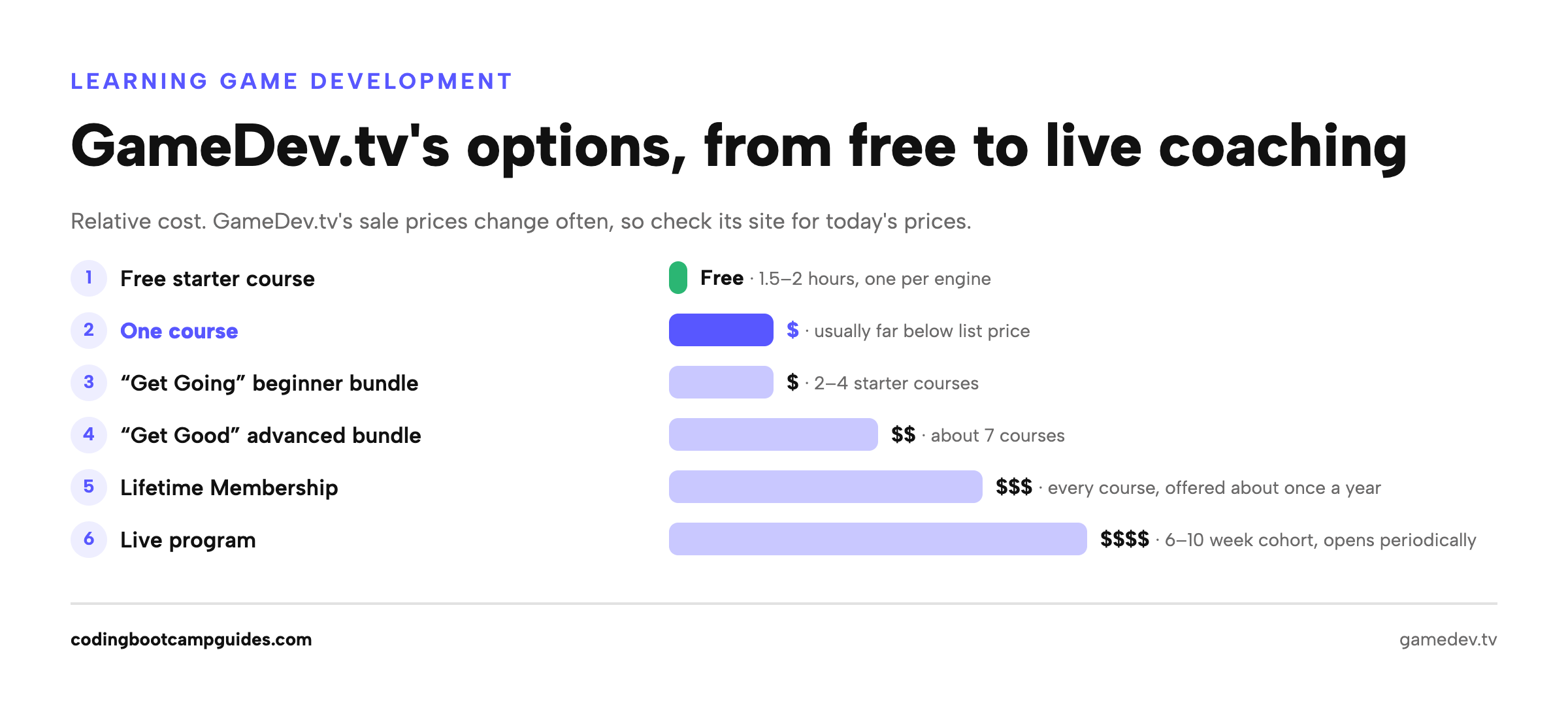
GameDev.tv shows high list prices and sells almost everything at a discount, and its sales change often. Here’s how the options compare, from cheapest to most structured:
| Option | What you get | What to expect on price |
|---|---|---|
| Free starter courses | A 1.5–2 hour intro to Unity, Unreal, Godot, or Blender | Free |
| One course | Lifetime access to that course, its updates, and Q&A | List prices of about $49–$195; usually on sale for a small fraction of that |
| “Get Going” beginner bundle | 2–4 starter courses for one engine | Usually less than buying the same courses one at a time at list price |
| “Get Good” advanced bundle | About 7 intermediate courses for one engine | The bigger bundles cost more, and are also discounted |
| Lifetime Membership | Every course, current and future; perks below | A one-time payment, offered for limited periods |
| Live program | 6–10 weeks of live coaching with a cohort | The most expensive option; enrollment opens periodically |
Explore GameDev.tv’s current bundles and deals to see today’s prices.
Two things to know about GameDev.tv’s pricing:
- The discounts are the normal price. One Trustpilot reviewer complained that a course “might be listed as $195 but permanently sold for $15.” Compare sale prices, not list prices, and ignore the “value” figure on the membership page.
- Udemy is sometimes cheaper. GameDev.tv’s help page says it can’t price-match Udemy, which runs “very aggressive, constantly changing discounts.” More on that below.
Is the Lifetime Membership worth it?
The Lifetime Membership is a one-time payment for every GameDev.tv course, including future ones. GameDev.tv says it’s normally offered once a year, and that its price goes up as more courses are added. It covers courses only, not asset packs, workshops, or live programs, though members get some free assets and discounts on live programs. The 30-day refund applies.
To decide, compare the membership price with what you’d actually spend. Divide the membership price by the sale price of a single course: that’s how many courses you’d need to finish before it pays off. When we checked, that worked out to more than 40 courses, and very few people finish that many. A more realistic plan for a beginner is one engine’s beginner bundle, then one or two intermediate courses.
- Buy it if: you’ve already finished a GameDev.tv course or two, and you want to learn more than one engine plus art (Blender) or audio.
- Skip it if: you haven’t made anything yet, you only need one engine, or you’re buying it to feel committed. One reviewer on GameDev.tv’s own page put it well: it won’t “magically get you to finish your game idea.”
Compare the Lifetime Membership with GameDev.tv’s other bundles to see what’s available.
What you can learn
The catalog is organized by engine and skill. Highlights for beginners:
| Track | Beginner courses | Then |
|---|---|---|
| Unity (C#) | Complete Unity 2D Developer, Complete Unity 3D Developer, or the Get Going with Unity bundle | RPG series (combat, inventory, quests), multiplayer, mobile, RTS, turn-based strategy |
| Unreal Engine | Unreal C++ Developer, Unreal Blueprints, or the Get Going with Unreal bundle | Action combat, multiplayer co-op, stealth, survival, FPS, Niagara VFX |
| Godot | Godot 2D Game Dev, Complete Godot 3D, or the Get Going with Godot bundle | Action RPG, roguelike, multiplayer, mobile, shaders, C# in Godot |
| Blender (game art) | Complete Blender Creator, Blender Environment Artist, or the Blender Pathway bundle | Characters, animation and rigging, sculpting, texturing, exporting to Unity, Unreal, and Godot |
| Other | C++ Fundamentals, Complete Pixel Artist, Game Audio Essentials, Math for Video Games | Level design, game feel, Git for game projects, GameMaker |
There’s also a short “How To Get A Job In The Game Industry” course on résumés, portfolios, and LinkedIn. Each engine has a free starter course: Unity, Unreal, Godot, and Blender. Not sure which engine to pick? Take two of the free courses before you pay for anything.
Our GameDev.tv course reviews
We review GameDev.tv’s main beginner courses one by one:
- Complete Unity 2D Developer: four 2D games in Unity 6 and C#.
- Complete Unity 3D Developer: five 3D games, ending with a first-person shooter.
- Unreal 5 C++ Developer: four Unreal Engine games in C++.
- Unreal Blueprints: three Unreal games with visual scripting, no code.
- Godot 4 2D Game Dev: three 2D games in GDScript.
- Complete Godot 3D: three 3D games in Godot 4.
- Complete Blender Creator: 3D modeling for game art.
- C++ Fundamentals: pure C++ through three small games, no engine.
How the courses work
- Self-paced video with projects. You build small games as you go, and course assets are yours to use in your own projects, including commercial ones, unless a course says otherwise.
- Help comes through Q&A. Each course has a Q&A section where teaching assistants answer questions and can “loop in the instructors.” Some Trustpilot reviewers say support was slow or “a bit lacking,” so don’t count on fast one-on-one help.
- Updates are selective. GameDev.tv says it doesn’t re-record courses for every engine release, but fixes anything that would “break your experience,” with a short video or, for bigger courses, a full update. Engines change fast, and some reviewers found older engine versions in bundled courses. Check the engine version on a course page before you buy, and follow along in the same version.
- Captions are available on most courses.
- Certificates. You get a certificate of completion when you finish a course. It’s a nice record, but employers in games hire from portfolios, not certificates.
Live programs
GameDev.tv also runs live programs: 6 to 10 weeks of live coaching with a cohort, covering Unity C#, Unreal C++, Godot, indie game development, 3D art, and game asset creation. They cost far more than the self-paced courses, and each one opens for enrollment periodically rather than year-round. See GameDev.tv’s live programs and upcoming cohorts.
GameDev.tv vs. Udemy
Many GameDev.tv courses are also on Udemy, and a GameDev.tv moderator says the team tries to keep the two versions the same. They’re separate platforms, though:
- Price: Udemy’s discounts vary by country and change constantly, so the same course can be cheaper there. GameDev.tv says it won’t price-match.
- What’s only on GameDev.tv: the Lifetime Membership, live programs, bundles, and (by GameDev.tv’s account) course updates first.
- Moving courses: GameDev.tv’s free migration from Udemy only covers Udemy purchases made before January 31, 2026.
If you’re buying one course and it’s cheaper on Udemy, buy it there. If you want bundles, the membership, or a live program, buy on GameDev.tv.
What students say
GameDev.tv says it has taught more than 2 million students. Its Trustpilot rating is 4.0 out of 5, but from only about 50 reviews, few of them recent, so treat it as a small sample. Reviewers praise experienced instructors and clear explanations. The complaints are outdated engine versions in some courses, list prices that are never really charged, and slow help in Discord and Q&A.
The job market: read this before you buy anything
Game development has become a hard industry to get hired in. About 9,200 games-industry jobs were cut in 2025, and more than 10,900 more by October 2026, according to the ASGC layoffs tracker. In GDC’s 2026 State of the Industry survey, 28% of respondents had been laid off in the past two years, and 48% of those laid off hadn’t found another industry job.
That’s the best argument for GameDev.tv’s prices: spend tens of dollars, not tens of thousands, to find out whether you love this. And if you learn to program in C#, C++, or GDScript, those skills carry over to regular software jobs, which is where most of our readers end up. See our guide to becoming a game developer for the paths, costs, and the software angle.
Pros and cons
Pros
- Very low cost to start: free intro courses, plus heavily discounted courses and bundles.
- Game development only, across all four major tools: Unity, Unreal, Godot, and Blender.
- Project-based: you build real small games, with assets you can reuse commercially.
- 30-day, no-questions refund on courses and the membership.
- A path to more: bundles, a lifetime option, and live programs if you want structure later.
Cons
- Some courses lag behind engine versions, so check before buying.
- Help is slower than a live class; Q&A and Discord support get mixed reviews.
- Inflated list prices and constant sales make prices hard to compare.
- Self-paced: no deadlines or cohort, so finishing is up to you.
- No accredited credential, and the certificate carries little weight with employers.
From Michael, Hack Reactor ’16: My own path into software was a full-time bootcamp, a big commitment of time and money. For game development, I’d do the opposite. The industry has been too unpredictable to pay a lot up front. A free course, an inexpensive bundle, and a few months of shipping tiny games will tell you more about whether this is for you than any expensive program. If it turns out you love the programming more than the games, that’s a good outcome too: the same skills get people hired in software.
Who should choose GameDev.tv?
- Good fit: you’re curious about making games and want to try it cheaply; you’re a hobbyist or indie developer; or you’re a programmer who wants to add Unity, Unreal, or Godot.
- Look elsewhere: you need live teaching and deadlines (look at GameDev.tv’s live programs, or see mentored options in our game development guide); you want an accredited credential; or you want broad programming fundamentals first (a general coding course will serve you better).
Alternatives
| Option | Cost | Format | Best for |
|---|---|---|---|
| GameDev.tv | Free to low-cost; live programs cost more | Self-paced video courses | Trying game dev cheaply across engines |
| Udemy (same courses, plus others) | Low-cost; varies by sale and country | Self-paced video courses | One course at the lowest price |
| Unity Learn, Godot docs, Epic Developer Community | Free | Official tutorials | Learning one engine for free |
| Harvard CS50’s Introduction to Game Development | Free to audit | University lectures and projects | A rigorous, free foundation |
| Michigan State Game Design and Development with Unity (Coursera) | Coursera subscription | 5 courses, about 78 hours | A structured university-style path (uses an older Unity version) |
| Zenva | Subscription | Project-based “mini-degrees” | Structured paths by engine |
| CG Spectrum | Thousands of dollars | Mentored online courses and accredited programs | One-on-one mentorship and a credential |
Compare every option, with costs and the job market, in our guide to becoming a game developer.
Questions to ask before you buy
- Which engine version does this course use, and when was it last updated?
- Is this course cheaper on Udemy today?
- Is the course in a bundle that costs about the same?
- Will I take enough courses to justify the Lifetime Membership, or am I buying motivation?
The verdict
GameDev.tv is a good, low-risk way to learn game development: a free course to start, inexpensive courses and bundles to keep going, and a 30-day refund if it’s not for you. Its weak spots are uneven support and some aging courses, so check engine versions before you buy. The Lifetime Membership is good value only for people who already know they’ll take many courses. For everyone else, start free, finish one small game, and decide from there.
Explore GameDev.tv’s current bundles and deals, or read our guide to becoming a game developer, which compares every path from free to accredited.
GameDev.tv FAQ
Is GameDev.tv worth it?
For beginners, yes, as a low-cost way to learn: there are free starter courses, paid courses and bundles are usually heavily discounted, and every purchase has a 30-day refund. Check the engine version of a course before buying, since some courses are older.
Is GameDev.tv legit?
Yes. It’s an established game development school founded by Udemy instructor Ben Tristem, with courses also sold on Udemy and a published 30-day refund policy.
How much is the GameDev.tv Lifetime Membership?
It’s a one-time payment that covers every current and future course (not assets, workshops, or live programs). GameDev.tv normally offers it once a year, and the price rises as courses are added, so check its bundles page for the current offer.
Does GameDev.tv give certificates?
Yes. You get a certificate of completion when you finish a course. It isn’t accredited and doesn’t carry academic credit.
Is GameDev.tv better than Udemy?
Many courses are the same on both. Udemy is sometimes cheaper for a single course; GameDev.tv has bundles, the Lifetime Membership, live programs, and its own teaching assistants.
Can GameDev.tv get me a job in game development?
Not on its own. Game studios hire from portfolios of finished games, and the industry had heavy layoffs in 2025 and 2026. Use the courses to build and ship small games, and know that the programming skills also transfer to software jobs.

Michael has a diverse background in software engineering, mechanical engineering, economics, and management. After a successful career in mechanical engineering, Michael decided to become a software engineer and attended the Hack Reactor coding bootcamp. Michael enjoys writing about his experiences and helping others start their journeys in software development.